


Snapchat is one of the best smartphone apps popular among teenagers and adults for sharing moments and connecting. Unlike many other applications, it provides users with multiple features such as “snap stories” and “lens filters.”
Among them, one of the most interesting and authentic features is the ability to pin someone. Have you ever heard about this feature? But do you know how to pin someone on Snap? If not, then keep reading because I’ve compiled a guide on how you can pin someone on Snapchat.
So, Let’s Get Going!
How to Pin Someone on Snap Without Snapchat Plus?
Here are some easy to follow steps on how to pin someone on Snap for free.
Step 1: Open the Snapchat App
The first step is to open the Snapchat app on your mobile phone. First of all, make sure that you have logged in with all your credentials. If you are logged in successfully, all features of this app will be shown to you on the home screen, as you can see in the image.

Step 2: Go to the Chat Section
Now go to the chat section by clicking on the contact option. The contact list of your mobile will appear. Here you can eliminate the need for scrolling down this list as you can search for a specific contact that you are going to pin.

Step 3: Click the Profile Option
In this step, you have to click on the profile option in the left corner. Here your friend’s snap information will be shown to you in a charming page that shows your connection with him/her. Now see the below image.

Step 4: Pin the Conversation
Now, you have to hit the three-dot icon option. After clicking on it, you will see several options, including “chat and notification settings.” When you hit this option, multiple sub-options will be shown to you, including the “Pin Conversation” option. Finally, click on this to pin that person, as you can see in the below image.

How to Un Pin Someone on Snap Chat?
Here are some of the easy to follow steps on upinning someone on Snapchat.
- Open the Snapchat app and go to the chat section.
- Select the pinned person conversation you want to unpin.
- Now click the profile section and select the “chat notification and settings” option.
- Here you will see the multiple options. Select the “unpin conversation” option.
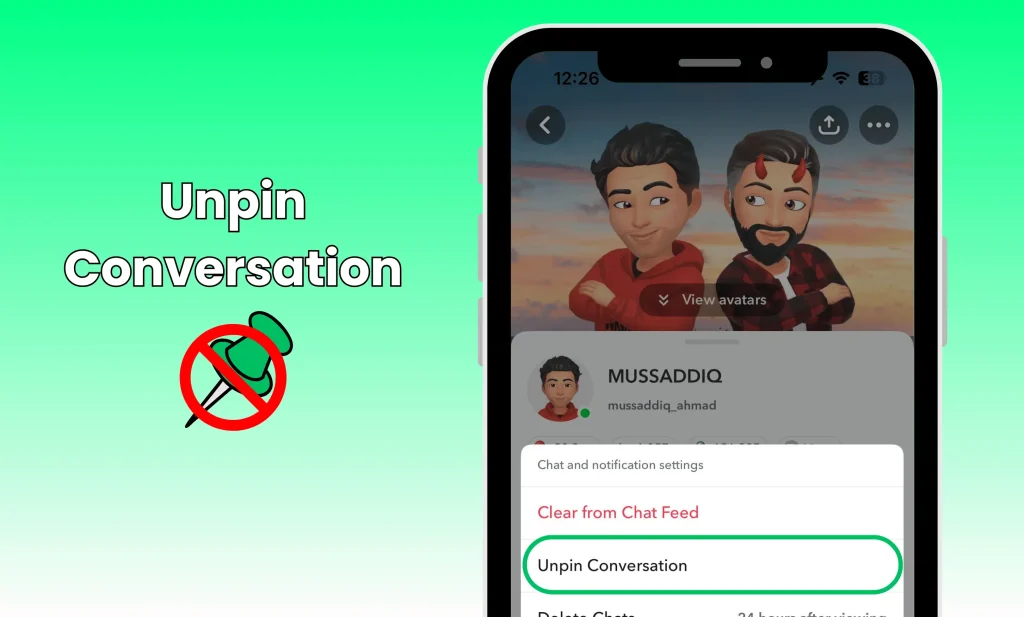
- The conversation will be removed from the top of your chat list.
| Good News |
|---|
| You can Unpin the Snapchat AI from the chat and Pin your favorite person at the top. |
4 Major Benefits of Pinning Someone on Snapchat
Here are some of the major benefits of pinning a conversation. Let’s discuss in detail one after the other.
1. Accessibility
Sometimes your chat list can be very long as you are in contact with hundreds of your friends. If you pin someone, you will be able to access their conversation or important messages without scrolling through the list for a long time.
2. Quick Replies
When your chat list is long, you may not be able to know who is sending the notifications to you. In this case, you can miss important information in such notifications. Pinning someone lets you know someone’s notifications immediately and reply to them quickly.
3. Prioritization
This authentic feature lets you prioritize someone who is most important to you. They may be your parents, siblings, teachers, and best friends. If you make your communication effective with them, it will give insights into your relationship with them.
4. Memories Saving
If you want to save someone’s messages for future reference, you can pin them. You can easily keep track of important and memorable conversations, ensuring you can revisit previous chats whenever you want.
Before You Go
Pinning someone on Snap is one of the helpful features to improve communication between friends. These features provide multiple benefits such as quick accessibility quick reply to notifications and prioritizing anyone.
In this blog, I’ve discussed a comprehensive guide on how to pin someone on Snap and how to un pin someone on Snap chat. These steps can easily pin someone’s chat that you can read in the future, too.
FAQs
1. What happens if I pin someone as my #1 bff?
When you pin your top friend as your #1 bff, a new Best Friend Emoji ❤️🔥 will appear in both of your Chat feeds and Friendship Profiles and not with Yellow Heart.
2. How many bff can you have on Snapchat?
You can have at least 8 and up to 8 bff on Snapchat who are regularly updated.
3. How does Snap score work?
Snap score indicates a user’s engagement level on the application by adding together the snaps they transmit and obtain. Their involvement with stories, and various other activities within the app, also affect the snap score.
